Player guides
Playing Forged Realms with Mudlet
Connect to Forged Realms in Mudlet, add gossip and tells to an existing profile, and walk to a new area from the world atlas.
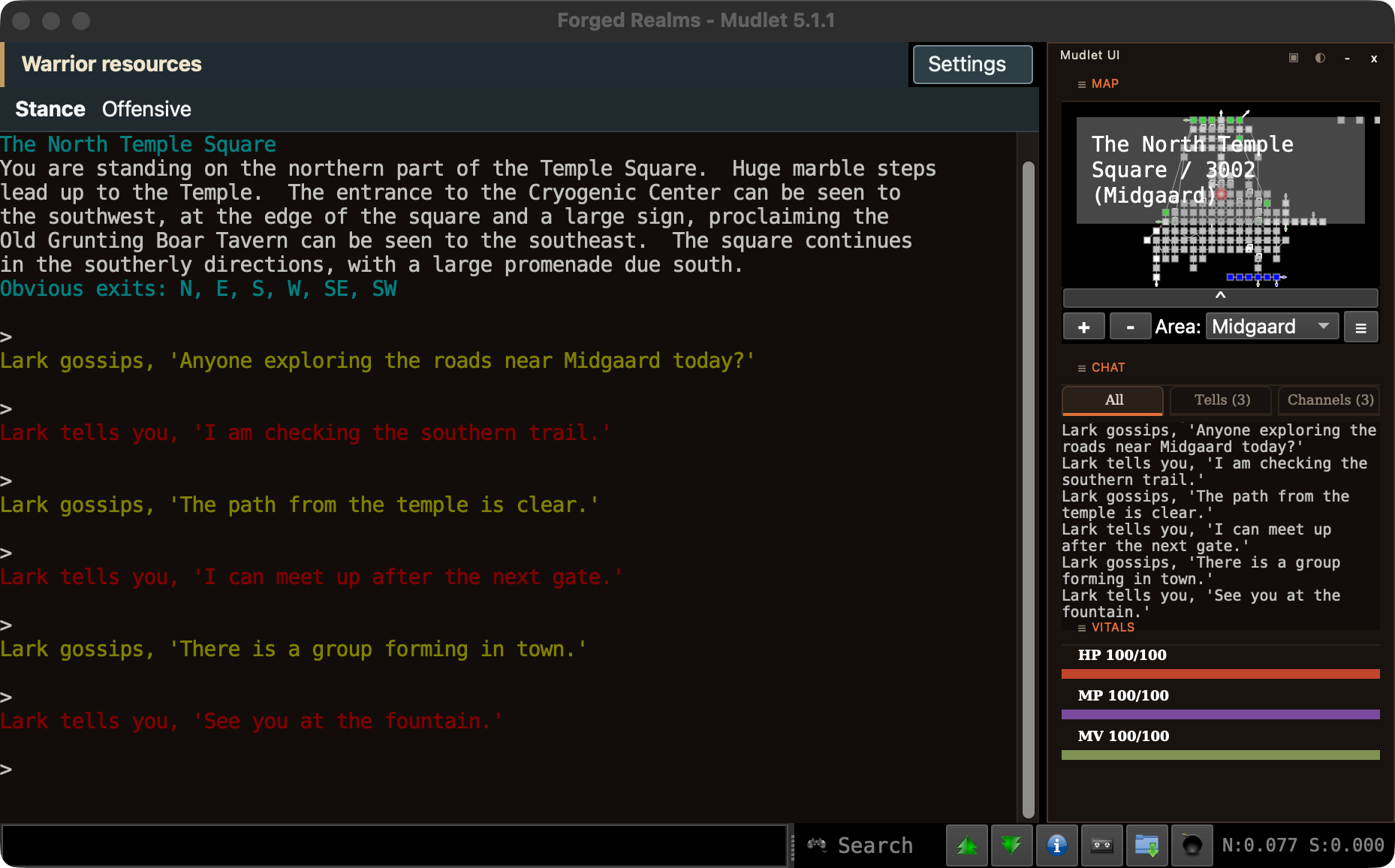
At the North Temple Square, a friend sends you a tell about taking the southern road. You can finish reading the room, open Tells to catch the message, then use the atlas to work out where to meet. The same Mudlet package supplies the room map, chat tabs, and party health.
Watch the Mudlet walkthrough, or see the quick map tour.
Connect or update your profile
- Open Mudlet. Use your existing Forged Realms profile, or create a new one if this is your first visit.
- Set the host to
mud.forgedrealms.netand the port to4001. Turn Secure / TLS on and leave certificate verification enabled. Port4000also works with Secure off, but sends your connection unencrypted. - Connect and enter your character name. To install or update the interface, type
MUDLETMAP INSTALLin the game. For automatic setup, enable GMCP and Allow server to install script packages in your Mudlet profile.
An older profile gets a notice when a newer package is available. You choose when to install it. Your hand-drawn map, notes and saved panel choices stay in your profile. If you prefer to install the package yourself, open the Forged Realms Mudlet package in Mudlet’s Package Manager.
Find the conversation
Open Channels for gossip, Tells for private messages, or All for both. The main game window still receives the conversation. You can also type FRUI CHAT TELLS or FRUI CHAT CHANNELS to open a tab from the keyboard. If you already use Mudlet’s starter interface, these are its familiar tabs. Older profiles get them in the Forged Realms panel.
Pick a destination
Type FRMAP to open the room map. On the public map, double-click a reachable room to walk there. For a longer trip, type FRMAP WORLD and select an area to see its neighbors. Your character stays put while you browse. Press Walk to this area when you are ready to head for an entrance. Type FRMAP STOP to stop early.
Area walking uses the Forged Realms room map. If you use a personal map and decide to switch, FRMAP IMPORT backs it up before importing the public map. You can keep using your own map and still get chat and player panels.
See what your party needs
Group with another player and the party panel shows their health and whether they are in the room with you. The class panel follows your character. A Flow Monk sees Current, and a Bear Druid sees Rage. Type FRUI SETTINGS to choose which panels appear, or FRUI ON to bring back a hidden interface.
New to the realms? The first adventure guide starts at character creation. If you want help getting connected, join the Forged Realms Discord.
NEWS FROM THE REALMS
Follow the next chapter.
The beta is open to try now. Leave your email for development updates, new adventures, and release news.